Floors#
From INSUL version 6.0, INSUL predicts the impact insulation performance for massive, rigid, homogeneous floor constructions such as concrete floors. From INSUL version 6.4, INSUL also predicts impact insulation performance for lightweight floor constructions such as timber-joist constructions.
To predict the impact insulation performance of a simple floor system:
- Select Floor from the INSUL Construction tabs
- From the INSUL Panel tabs select either a Single, Double or Triple construction. Select the required arrangement of floor layers on on Panel 1 tab. The thickness, number of linings and material constants can all be set as per the instructions discussed for Single Panels.
Joists#
From INSUL Version 6.4, the properties of joists can influence predicted levels of impact sound. From INSUL Version 9.0, Joist spacing and depth can be adjusted from the Frame 1 and Frame 2 tabs using the Frame Parameters.
Ceilings#
A ceiling may be included in a floor construction model by selecting Double or Triple from the INSUL Panel tabs. The frame type, ceiling airgap and joist spacing and the inclusion of cavity absorption can all be set directly from the Frame 1 and Frame 2 tabs as required.
Floor Covers#
A model of impact sound pressure levels can include the effect of floor covers.
Adding a floor cover
-
From the INSUL Construction tabs, select the Floor tab.
-
From the INSUL Panel tabs select Single, Double or Triple as required. Then select the Floor Covers tab.

-
There are options to model floor cover performance based on Measured or Predicted data. Select the preferred arrangement, and then select a floor cover from the Floor Cover list.

-
The Floor Cover list can be filtered to sort by Category. The Floor Cover list can also be searched by keyword for quick access to materials.
Tip
Because the performance of a floor cover can depend on the underlying type of floor construction, the floor covers included in the Floor Cover list will change depending on whether a lightweight or heavyweight floor construction has been selected on the Panel 1 tab from the INSUL Panel tabs.
-
Once a floor cover has been selected, its performance can be viewed from the Floor Cover Chart from the INSUL Charts and Tables. A single number rating for the improvement in impact insulation by the floor cover is shown in the chart legend. The rating is labelled either ΔIIC or ΔLn, depending on the Impact Rating Method selected.
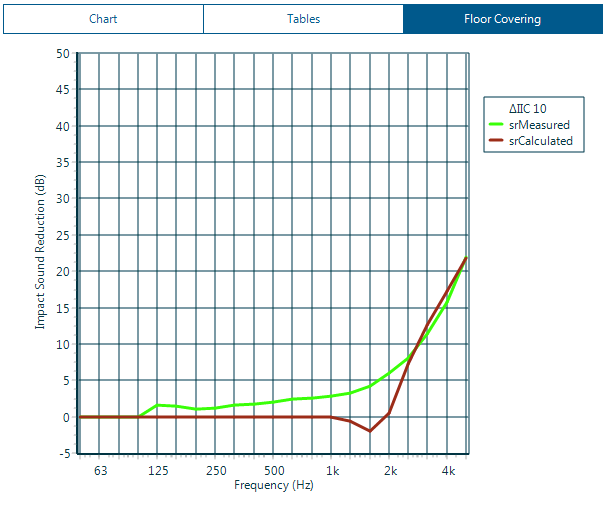
Measured performance
INSUL includes measured levels of impact sound reduction for a large range of floor covers and finishes. The data has been obtained from either laboratory measurements, typically according to ISO-140-8, or from field measurements (many of which have been carried out by Marshall Day Acoustics).
Measured data can be edited, imported and deleted from the Materials Editor. If adding new measured data into INSUL, it is recommended to add this to the User list.
Predicted performance
From INSUL Version 8.0, INSUL includes options for predicting floor cover performance for heavy weight floors, for some types of floor covers.
INSUL inclues material properties for all relevant floor covers in the Floor Covers list to enable calculations of predicted performance.
For new floor coverings, relevant data can be edited, imported and deleted from the Materials Editor. If adding new data for predictions, it is recommended to add this to the User list.
Important
Predictions can be made for 6 available floor cover categories: Tile, Screed, Timber, Vinyl, Cork & Rubber. Predictions are not currently possible for Carpet or Miscellaneous category floors. Also, Floating floors and Raised Access floors require alternative modelling techniques.
Adjusting data for floor covers
Floor cover properties can be temporarily adjusted by clicking on the floor cover in the INSUL Illustration. This will open the Properties window.
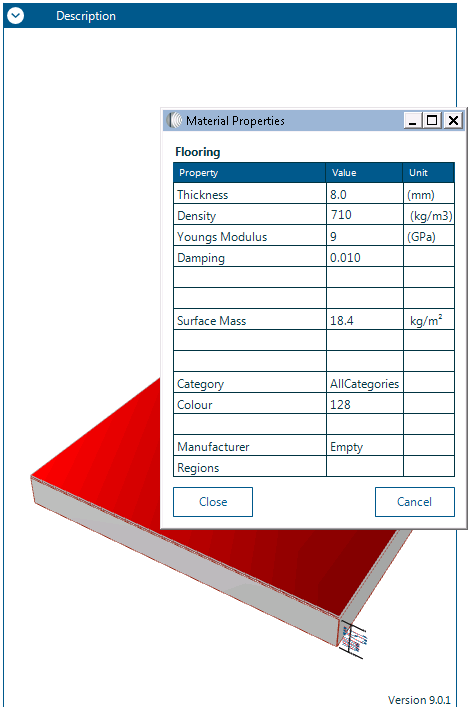
From the Properties window a floor cover's thickness, density, modulus of elasticity and damping can all be changed.
To make permanent changes to a floor cover's properties, use the Materials Editor.