Material Properties#
The important physical properties of a material can be examined by clicking the material in the INSUL Illustration. This will open the Material Properties window.
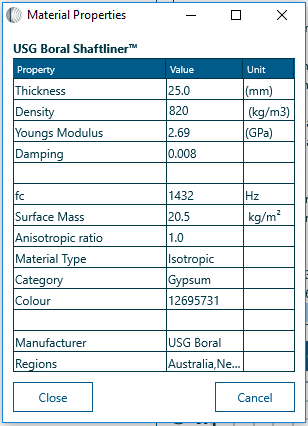
The Properties window shows various physical properties such as density, loss factor and stiffness, and the colour of the material is also shown.
For more complex material types additional properties are also shown such as orthotropic ratio, or elastic core properties.
These properties may be temporarily changed by entering new values in the appropriate box. It is important to note, however, that changes made in the Properties window are lost when different material is selected from the Product list.
To make permanent changes to a material's properties use the Materials Editor.
Editing Materials#
Isotropic materials
To model a new sound insulation material, generally, 3 parameters are needed:
- the density of the material
- the modulus of elasticity
- the internal damping of the panel
These are adequate to define a large number of normal materials, which are called isotropic materials in INSUL because their properties are the same in all directions.
The density is usually easy to determine either by direct measurement or from manufacturers data. The modulus of elasticity can be determined from the surface mass and critical frequency determined from a TL test on one particular thickness of the material. Manufacturers can also often provide data on the elastic modulus since it is usually needed for strength and deflection calculations for building materials. The damping (loss factor) can be determined from measurement or from TL test data. You can display these three properties for an existing material by clicking on the picture of the material.

Other material types
From INSUL version 6.4, INSUL can model several other types of material:
- Orthotropic
- Elastic core
- Inelastic core
A brief discussion of these materials types is given here. All of these material types can be added to materials files using the Materials Editor.
Adding a new material#
Based on manufacturer's data
In general, it is best if you have manufacturers test data on some thickness of a single panel of the material. If you do have the TL for new material, then the recommended procedure is as follows:
- Enter the data as a ref spectrum. in the table page.
Choose a similar material, if possible, from the Materials list. - Set the thickness to the correct thickness and alter its properties using the "Materials Properties" form. Enter the density of the material if you know it or adjust the density in the Material Properties form until you get the low frequencies as correct as possible.
- Then alter the Young's Modulus until you get the critical frequency dip as close as possible to the correct frequency, then you alter the loss factor until the high frequencies match as well as possible.
Once you have worked out the best combination of density, Young's Modulus and loss factor, then open up the Materials Editor and enter it as a new material.

Once the material has been saved in the Materials Editor, it can be selected from the Materials List menu. It is now possible to export and import materials via an XML file.
Without manufacturer's data
If you do not have any test data on the material then you need to know the density of the material, the Modulus of Elasticity and if possible the internal damping of the material (if the loss factor is not known set it to 0.01). This data (density, Young's Modulus and loss factor) can now be entered into the Materials Editor.
Material colour and texture#
The easiest way to get the number of the colour you want is to go the materials properties form and use the colour picker to find out the number of the colour you want.
From INSUL Version 7.0, both the colour and texture of a material can be set directly from the Material Properties dialog box or the Materials Editor.