Settings#
To open the Settings windows either:
- From the INSUL Toolbar, click the
 button
 - From the Project menu select: Project > Settings
The Settings window includes six primary tabs: General, Units, Materials, Auralisation, Flanking and Calculation.
General#
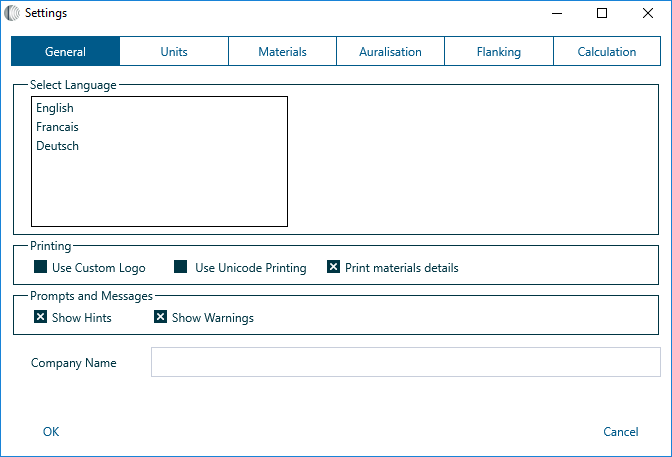
The General tab provides options to:
- Change the INSUL language
- Configure aspects of the print setup including Custom Logo, Unicode Printing , Company Name and the printing of materials details
- Show and hide Hints and Warnings
Units#
The Units tab provides an option to update measurement units to either Metric or English.

Restart required
INSUL must be restarted after changing the units for the changes to be made correctly.
Materials#
The Materials tab provides options to:
- Update the Regions settings which effect the information presented in products lists
- Change the path for accessing Custom materials lists

Further features for managing the INSUL database of materials are provided in the Materials Editor.
Auralisation#
The Auralisation tab provides options for updating Auralisation settings, including:
- Selecting an alternative source file
- Adjusting the Audio Gain
- Adjusting the Ramp up time

Windows only
Auralisation is not currently enabled for INSUL on macOS.
Flanking#
The Flanking tab provides access to the parameters which determine the shape of the Flanking limit curve displayed in the INSUL Chart. The flanking tools include information for masonry, lightweight and custom flanking details.

Calculation#
The Calculation tab provides a set of four tabs for adjusting aspects of INSUL's calculation configuration: Properties, Roof, Leaks and Evaluation.

Properties
The Calculation Properties tab allows adjustment of:
- Sewell's Correction, which adjusts the predictions based on panel size.
- Edge damping
- The Profile Panel calculation setting, Use Lam Windle
- Dimensions for the Test Panel
- Dimensions for the Glazing Test Panel
- Dimensions for the Roof/Floor
- Room properties, specifically Volume and Reveberation time
Roof
The Calculation Roof tab allows adjustment of rainfall noise settings.

Leaks
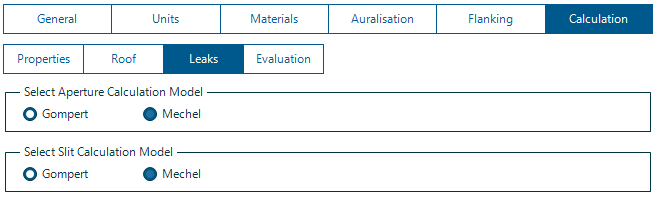
The Calculation Leak tab provides options for adjusting the leak calculation configuration.
Evaluation
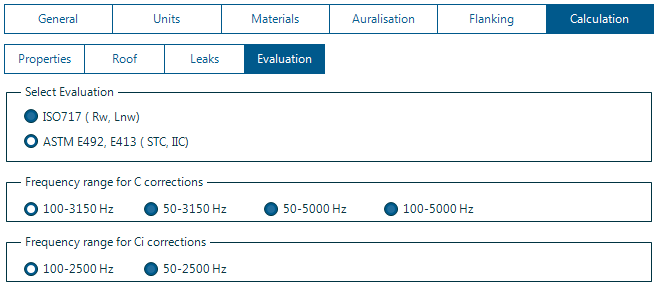
The Calculation Evaluation tab provides options for adjusting single figure index evaluation seetings including the frequency range for assessment of the C-Correction when using the ISO 717 evaluation method.