Single#
Panels#
To predict the Transmission Loss (TL) of a Single panel, from the INSUL Panel tabs select the Single > Panel 1 > Layer 1 tab:

The material being modelled can be changed from the Products list:

INSUL materials and User materials
INSUL includes hundreds of different materials, each with a unique set of material properties defined by INSUL.
The materials at the top of the Products list in a blue font are the users customisable materials. The materials in the Products list shown in dark grey or black font are INSUL materials.
The Products list can be filtered to sort through materials by Category and Manufacturer. The Products list can also be searched by keyword for quick access to materials.
To initiate a calculation, either:
- Click
 on the tool bar
- Press enter
Thickness, Quantity#
The thickness of the material can be changed in the Thickness box:

The number of layers of this material can be changed from the Quantity control, by typing a new value or using the < and > controls.

A single panel can comprise more than one material. Materials can be added to a panel as different layers, using the Layer 1 tab through to the Layer 6 tab.
Material properties#
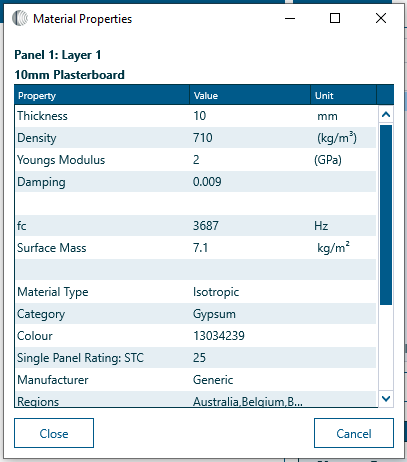
Material properties can be temporarily adjusted from the Material Properties window, which can be opened by clicking on the material in the INSUL Illustration.
The Material Properties window provides access to Thickness and Number of, and also the Modulus of Elasticity, damping and other relevant properties.
Info
It is important to note that changes made in the Material Properties window are lost when different material is selected from the Product list.
Materials properties can be changed permanently, and new materials can be created, from the Materials Editor.