Outdoor to Indoor Calculator#
INSUL is primarily a tool for predicting the sound transmission loss of a wall or floor.
However, a simple calculation tool is included for working out the overall transmission of noise from outdoors to indoors. For instance, with aircraft or road traffic noise incident on a house or the facade of an apartment, what will be the noise level inside a particular room? INSUL can be used to complete this calculation.
Calculation standard
INSUL calculates outdoor to indoor transmission in accordance with EN 12354-3:2000 "Building Acoustics - Estimation of acoustic performance of buildings from the performance of elements - Part 3: Airborne sound insulation against outdoor sound."
Getting started#
 Open up the Outdoor-Indoor Calculator from the INSUL toolbar.

When the calculator opens for the first time, the calculation will include some generic information about the area of Element 1, the volume of the indoor space and reverberation time of the indoor space. Extra details need to be added to set up a meaningful model.
An outdoor to indoor calculation comprises three basic parts.
Part |
Notes |
|---|---|
| Outdoor sound | The level of sound arriving at the facade |
| Facade | Details of the facade or building envelope. The facade may comprise several elements, each with its own area and sound insulation performance. |
| Indoor space | The acoustic environment indoors will affect the internal sound level. Room volume and reverberation time and important factors. |
How many frequencies?#
Acoustic calculations are generally required to be carried out at a range of different frequencies.
Calculations in the Outdoor to Indoor Calculator can be carried out using single (1/1) octave bands or one-third (1/3) octave bands.
The choice is primarily dependent on the information available and the degree of accuracy required. Traditionally, 1/1 octave bands have been used for engineering calculations, probably because historically this sped up calculations by a factor of 3 without much loss of accuracy for most purposes. For many noise sources which are broadband in nature (e.g. traffic noise), the change in precision between 1/1 octave bands or 1/3 octave bands would be very small.
If all the necessary model input data is available in 1/3 octave bands, then there is little point in not using it. If however some of the data is in 1/1 octave bands, then use 1/1 octave bands.
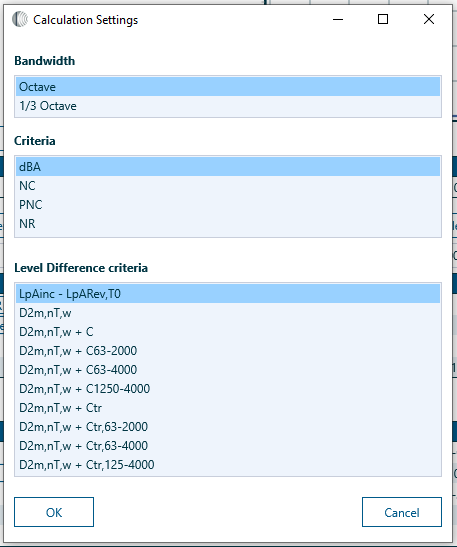
Change between 1/1 octave bands and 1/3 octave bands in the Settings window.
Fill in the blanks
Regardless of whether 1/1 octave bands or 1/3 octave bands are used, it is recommended that each Outdoor-Indoor Calculator model includes relevant details for every available frequency band in the calculation.
Leaving some frequency bands blank for some items of a calculation may lead to erroneous results.
Toolbar#
Item |
Action |
|
|---|---|---|
 |
Calculate | Refresh the calculation |
 |
New | Reset the model and start a new calculation |
 |
Open | Open a *.cns files |
 |
Save | Save the current calculation |
 |
Save As | Save the current calculation with a new file name |
 |
Create a printed summary of the current calculation | |
 |
Settings | Open the Settings window. |
 |
Copy | Copy selected data to the clipboard |
 |
Paste | Paste data from the clipboard into the selected cell(s) |
Settings#
The Settings window can be opened from the Toolbar to:
- Switch between 1/1 octave bands and 1/3 octave bands
- Change the Criteria metric
- Change the reported single figure rating for the Level Difference spectrum