Subscription licences#
A subscription licence for INSUL is provided via an online licence server.
A reliable internet connection is required
To access a subscription licence, a reliable internet connection is requried for each INSUL session.
This is because INSUL checks for the subscription licence at start up and then re-checks periodically through the course of the INSUL session.
A subscription licence can be arranged with your local distributor.
A subscription licence can be activated as follows.
- Open INSUL and select Help > About
Find the Help Menu

-
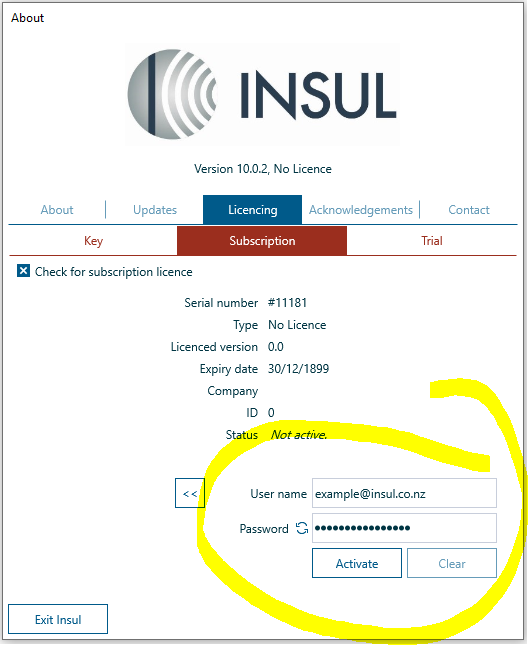
Select Licencing > Subscription
-
Select Check for subscription licence

-
Select Credentials to expose the credentials details
-
Update the credentials using the information for your subscription licence, as provided by your distributor
-
Press activate
Credentials could not be authenticated?
When a user name or password is copied and pasted into the credentials section in INSUL, this can sometimes add a space character at the end of the copied information. If this happens then the subscription licence activation will not succeed.
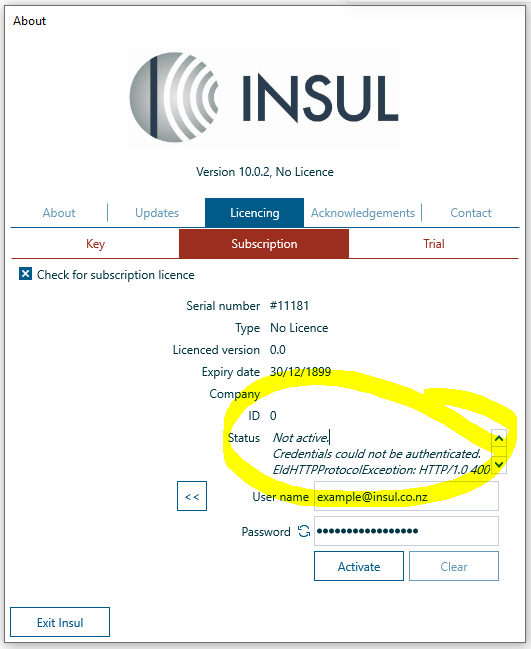
If this type of error is observed during activation, please check the end of the user name and password for space characetrs and, if present, remove them.