Facade#
Elements#
A facade or building envelop that separates an indoor space from outdoor sound will often be comprised of different parts. For example, a facade wall may be be made of brick but it will typically also include a window.
Each of the major components of a facade should be modelled separately if they are likely to have their own sound insulation performance.
The Outdoor to Indoor Calculator allows up to 8 different elements of the building envelope to be included in one model.
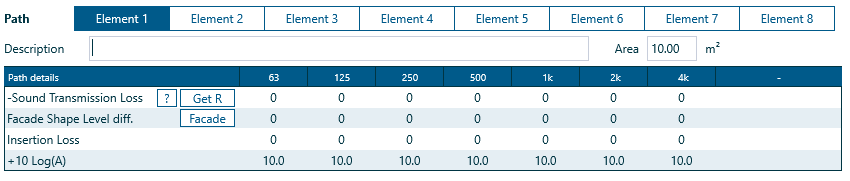
For each element can be configured with a specific area, transmission loss, facade shape level difference and insertion loss.
Area#
The area of each element included in the calculation will affect how much sound is radiated from the element into the indoor space. The larger the area of an element, the more sound is will contribute.
Each element in an outdoor to indoor calculation can be setup with a specific surface area.
Sound transmission loss#
The better the sound insulation peformance of an element, the less sound will be radiated from that element into the indoor space.
Transmission loss or sound reduction data can be added directly to the relevant cells for each element.
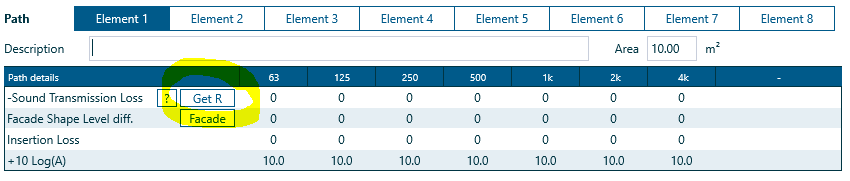
Alternatively, select Get R to add transmission loss data from the currently modelled system in INSUL.
INSUL system description...
If Get R is used to add transmission loss data to an element, the system description from INSUL will also be added to the element details.
To view the description from the Indoor to Outdoor Calculator, hover over the '?'.
Facade shape level difference#
As noted in EN12354/3 the facade of the building can affect the sound transmission by either shielding or reflective effects.
EN12354/3 contains a table of corrections to be applied to the calculations depending on the facade arrangement.
 Select Facade to open the Facade Shape Level Difference window.

Select the facade shape picture which best matches to facade arrangement being modelled.
The effect of reflection from an overhanging balcony above, and whether this balcony has an absorptive surface, and the shielding effect of one's own balcony front can be accounted for using the Line of Sight and Roof Absoprtion settings.
Select OK to close the window and the resulting facade shape level difference will be added to the currently modelled element.
Custom facade shape adjustment values can also be entered directly into the table.
A rule of thumb about shielding factors...
Based on consultants' experience, current practice is to use:
- -6 dB factor for the shielding of a side wall which is not directly visible by the source
- -3 dB for a roof
- -10 dB for a rear wall
These values are for guidance only and may be updated as more current research and experience becomes available.
Insertion loss#
Insertion loss values can be added directly to the table for each element as a way to customise or adjust the effective sound insulation performance of the element:
- Negative insertion loss values reduce the indoor sound level
- Postive insertion loss values increase the indoor sound level