Materials#
There are a wide range of materials that may be used when designing a partition or other construction elements. Every material has unique properties which affect how sound interacts with it and therefore the TL performance of any partition they are incorporated in.
INSUL features an extensive selection of Materials to choose from, as well as the ability to view and edit the properties of these materials, and even create new custom materials.
Properties#
The important physical properties of a material can be examined by clicking the material in the INSUL Illustration. This will open the Material Properties window.
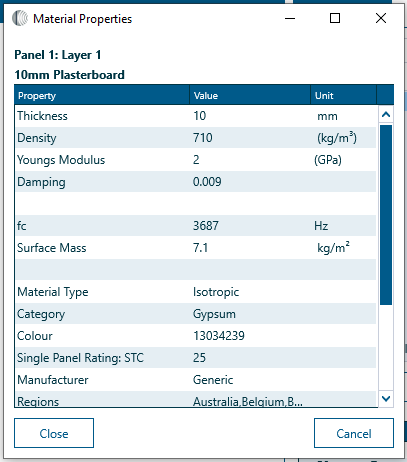
The Material Properties window shows the material name, type and various physical properties such as density, loss factor, and Youngs Modulus.
What can be changed from the Properties window?
Values in the Properties window which are shown in blue font can be adjusted.
Values and information shown in dark gray font cannot be edited directly.
Material Type
Each material is classified as a type in INSUL.
Type |
Description |
|---|---|
| Isotropic | Most materials in INSUL are isotropic type. They are considered to be homogeneous with uniform bending stiffness in all lateral directions. |
| Orthotropic | Materials such as CLT are orthotroipc type meaning they have different bending stiffness in different directions along the material. |
| Elastic Core | Some sandwich panels are classified as elastic core. They typically comprise two thin skin materails on each side of a light weight core material like polystyrene. |
| Inelastic Core | Some sandwich panels are inelastic core. They are similar to elastic core materials, but the core typically has higher bending stiffness. |
| Trapezoidal | Most profiled metal materials are classified as trapezoidal. |
| Corrugated | Some profiled metal materials are classified as corrugated. |
| Composite Steel Floor | Composite Steel Floor materials have a profiled metal deck tray which is typically filled with pour-in concrete or light-weight concrete. |
INSUL implements specific prediction algorithms for each material type.
Material Properties
For more complex material types, additional properties are also shown such as orthotropic ratio and profile dimensions.
Changing property values...
The value of material properties such as thickness, density and damping can be changed from the Material Properties window by entering new values in the appropriate box. When the Material Properties window is closed, the INSUL model will be updated to reflect the changes that have been made.
It is important to note that when values are changed in the Material Properties window, they are carried through to the INSUL model but they do not change the underlying values in the INSUL lists:
-
If the material is reselected from the INSUL lists, the INSUL model will be refreshed with default material properties.
-
To retain details of any changed material properties, it is best to save the INSUL model. When that model is re-opened, the changed values will be loaded back into INSUL.
-
To create or edit materials in the INSUL lists directly, use the Materials Editor.
Filtering#
Regions
Many products available in INSUL are unique to specific countries or regions. INSUL's materials lists can be filtered by selecting one or more regions so only items relevant to the selected region(s) are displayed.
The list can be filtered by the following regions.
Regions |
||
|---|---|---|
| Australia | Hong Kong | New Zealand |
| Belgium | Hungary | Poland |
| Brazil | India | Spain |
| Canada | Italy | Sweden |
| Chile | Israel | UK |
| China | Korea | USA |
| France | Middle East | |
| Germany | The Netherlands |
To view the active regions, open the Settings window and navigate to the Materials tab.
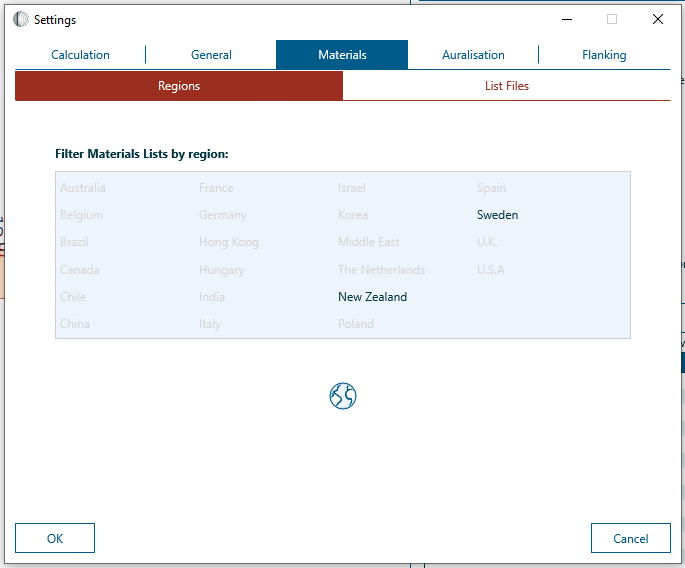
 Click the Globe icon to change the selected regions.
The region settings for each material can be viewed from the Materials Editor .
Category and Manufacturer
INSUL can filter materials and products by the type of material and by manufacturer for existing products.

These filters are next to the Products list on the main INSUL window. The filters change depending on what is being modelled (for example, panel, floor covers or cavity absorption).
Lists#
INSUL materials are divided into two lists.
- Materials which are include in INSUL by default are part of the INSUL lists
- New materials created using the Materials Editor are added to the User or Custom lists.