Glazing#
INSUL provides a specific set of tools for modeling the sound insulation performance of glazing. There are several reasons for this:
- Inherently low levels of internal damping in glass
- Edge-only pane support
- No intermediate framing in the cavities of multiple-layer systems
- No acoustically absorptive infill in the cavities of multiple-layer systems
INSUL provides two separate methods for predicting the sound insulation performance of glazing systems.
Model |
Comments |
|---|---|
| Energy-based | The energy-based model is the default glazing prediction method when INSUL starts for the first time. It is a semi-empirical model with a short calculation time and it can be used for quick predictions. It was the only prediction method available in earlier versions of INSUL (for example, INSUL version 9). |
| Wave-based | The wave-based model is the recommended prediction model. It has a longer calculation time, but the results are generally incrementally more accuarte than results using the energy-based model. This model is less reliant on empirical corrections. |
To model a glazing system, select Glazing from the INSUL Construction tabs.
To change between the energy-based and wave-based prediction models, select the small refresh button in the upper, righ-hand corner of the Glazing tab.

How to model Quad glazing
To model Quad glazing, the wave-based glazing model should be used.
The energy-based model is not able to prediction sound insulation performance for Quad systems.
Energy-based Model#
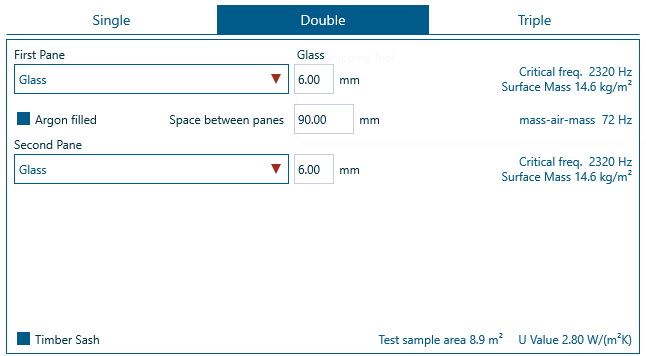
- Use the INSUL Panel tabs to select Single, Double or Triple as required
- Select the type of glass for the model from the drop-down list.
Monolithic and laminated glass materials are available. - For Double and Triple systems, specifiy the Space between panes, whether the cavity if Argon filled and whether the frame is a Timber sash
As each input to the model is changed, INSUL updates the predicted sound insulation values.
Wave-based Model#

- Use the INSUL Panel tabs to select Single, Double, Triple or Quad as required
- Select the type of glass for the model from the panel tabs ~ for example, Double > Panel 1, Double > Panel 2 or Triple > Panel 3.
Monolithic and laminated glass materials are available. - For Double, Triple and Quad systems, specifiy cavity details using the frame tabs ~ for example, Double > Frame 1 or Triple > Frame 2.
A range of different pane connections and cavity gases are available.