Trial Licences#
INSUL trial licences provide short term INSUL access so that INSUL can be used first-hand without needing a full licence.
A trial licence can be provided in 2 ways.
-
Most commonly, a trial licence is provided using a *.ldf file.
-
A trial licence can also be provided as a cloud licence.
Trial Mode has some limitations
When INSUL starts in Trial Mode, all sound insulation predictions are carried out as normal. The results are the same as those accessible using an full INSUL licence.
However, in Trial Mode, there are several features which are disabled, including:
- Saving models
- Opening saved files
- Printing
- Saving changes in the Materials Editor
*.ldf files#
A *.ldf trial licence file can be obtained from your INSUL distributor by email.
A *ldf file can be loaded into INSUL as follows.
-
Save the *.ldf file locally, for example on the PC Desktop
-
Start INSUL.
On start up, INSUL will search for a valid full or trial licence file.If no licence is found, then INSUL will show the About window.
From the About window select Licencing > Trial as highlighted.

-
Now select the Open file button and follow the prompts to load the *.ldf file.
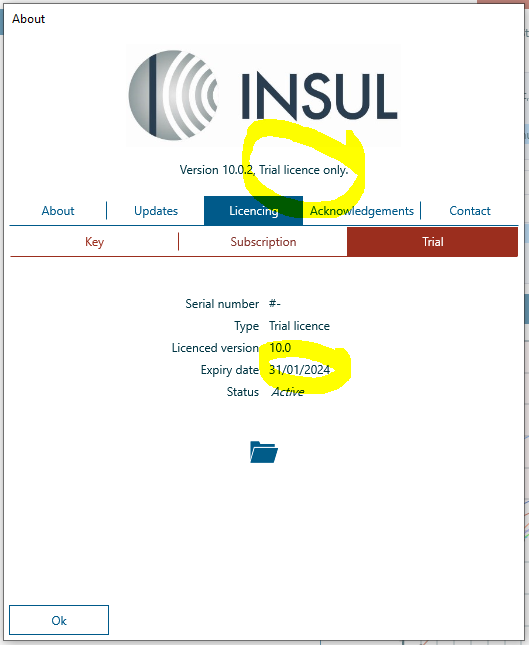
Once the *.ldf file is loaded, the INSUL About window header will show the licence type as Trial licence only.
The Trial panel will also show the trial licence expiry date. The trial licence will not provide access to INSUL after the expriy date.
*.ldf trial licences are single use
A *.ldf trial licence file can only be used once on a PC.
If you have used a *.ldf trial licence file to try out a previous version of INSUL and you would now like to try out the current version of INSUL, please contact your local distributor for assistance.
Cloud licences#
A cloud-based trial licence can be arranged with your local distributor.
Once the distributor has provided the licence credentials, these can be loaded into INSUL using the guidance detailed for subscription licences.