Print#
Formats#
A sheet can be printed which records the construction and the predicted results. There are two buttons associated with printing.
Item |
Notes |
|
|---|---|---|
 |
Select Print to display a print dialog box which enables the usual selection of printer properties etc before sending the page to the printer | |
 |
Print PDF | Generate a PDF file of the printout |
The Print button, when clicked will display a print dialog box which enables the user to do the usual selection of printer properties etc before sending the page to the printer.
Select the PDF button to generate a PDF file of the printout.
Print Quality
Printouts generated using the Print button are created as raster images. This usually provides suitable quality for physical printouts, but the resolution can appear compromised if viewing a digital form of the printout on a large screen.
For digital printing, it is recommended to use the PDF method of printing as this creates a vector based printout which will appear to much higher resolution on large screens.
It should be noted, however, that the chart and illustration shown on all printouts are raster based meaning their resolution is limited.
Bluebeam printing
When printing to Bluebeam pdf reader/writer, ensure that Use Unicode Printing is not selected, otherwise the text is not displayed.
Custom logo#
A custom logo or image can be added ot printouts.
The size of the logo on the page will depend on the resolution of the printer and the aspect ratio of the logo/image file.
Tips for logo or image size
For a 300dpi printer, a logo that is 600 pixels wide would end up 50mm wide on the printed page. The logo should be about 600-1000 pixels wide and about 150-300 pixels high for most printers.
To set custom logo or image:
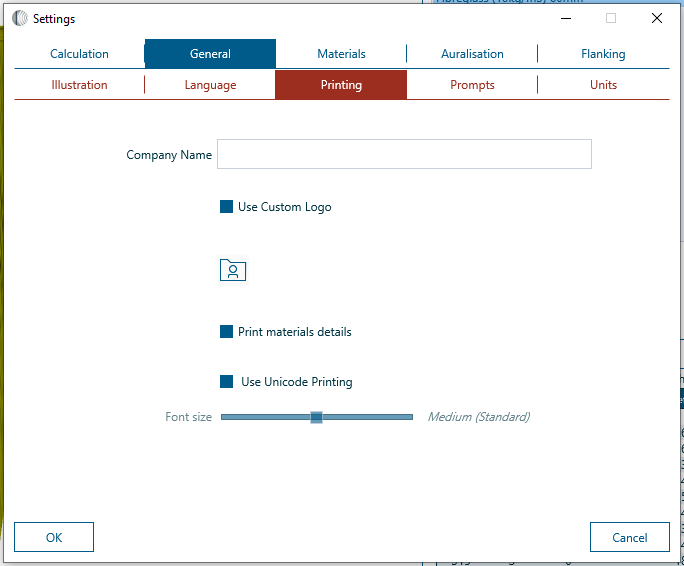
- Open the Settings window and select General > Printing
- Use the Open button to select the image file to be used. The image file must be a *.bmp file
- Check the box marked Use Custom Logo.
Print materials details#
When the Print materials details checkbox is selected from Settings > General > Printing, the INSUL printout will include the following material properties for each Layer of each active Panel:
- Surface mass (\rhos)
- Internal damping (\eta)
- Critical frequency (fc)
Here is an example of the System Description section of an INSUL printout, with material details included for Panel 1 and Panel 2:

Printing space is limited
As the INSUL printout summarises the entire INSUL model on a single A4 or Letter sized page, there is limited space available for the materials details.
If there are one or two active Layers in a Panel, then in most cases there will be sufficient space available to show the material details for each layer.
If there are three or more active Layers in a Panel, then INSUL will attempt to print all material details, but they may be truncated in some cases if insufficient space is available.
Font sizes#
Comments about print font size are under construction