Orthotropic Layers#
An orthotropic material is one that has pronounced differences in physical properties in two or more directions at right angles to each other. The effect of the orthotropicity is to introduce a second critical frequency and between the two critical frequencies the sound transmission loss is reduced compared to a simple isotropic panel.
INSUL can model both corrugated or trapezoidal (ribbed) materials including profiled, composite steel flooring.

INSUL can also model materials that are not profiled but have different stiffness in the X and Y directions.
The predictions are based on Heckl's (1960) paper "Untersuchungen An Orthotropen Platten".
The INSUL model for these types of panels relies on the Orthotropic Ratio property which describes the ratio of stiffness in the y and x direction (By/Bx). Temporary changes to the Orthotropic Ratio can be made from the Properties window. Permanent changes can be made from the Materials Editor.
Isotropic or orthotropic?
Most INSUL materials are isotropic, meaning that they are assumed to have with uniform bending stiffness in all lateral directions. Examples of isotropic materials include float glass, concrete and fibre cement.
Orthotropic materials include hollow core bricks, steel trapezoidal roof sheets, and concrete floors with cast in ribs.
Timber#
As a material, timber is inherently not isotropic. The Youngs Modulus in timber panels is affected by the orientation of the grain in the timber. In turn, the bending stiffness of timber panels varies significantly with changes in grain orientation.
Youngs Modulus values for timber panels also depend on the type of wood used for the panel. The Youngs Modulus value for a timber plate in the direction parallel to the grain is typically around 8 GPa to 15 GPa. In the orthogonal direction, the Youngs Modulus value is 5% to 10% of this.
Timber materials in INSUL are...
In earlier versions of INSUL, for example, version 7, many timber materials were configured as being isotropic.
In INSUL version 10, most timber materials are modelled as orthotropic.
CLT#
Cross-Laminated Timber (CLT) panels are comprised of layers of timber boards where the layers are orientated at perpendicular (cross) angles and bonded together with adhesive. This layering arrangement is motivated by the inherint orthotropic properties of timber.
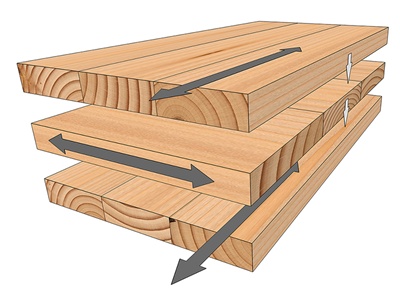
The orthotropic properties of CLT panels are more complex than those of timber alone.
Each laminate layer in a CLT panel will have bending stiffness values depending on the grain orientation of the timber boards in the layer.
The overall bending stiffness values of the CLT panel will then depend on the:
- type of wood
- grain orientation of the board in each lmainate layer
- thickness of each laminate layer
- total number of laminate layers.
CLT examples
A comparatively thin CLT panel, such as a 90 mm (3 ply) panel, will typically have a more pronounced orthotropic ratio.
A thicker CLT panel with more laminate layers, for example a 200 mm (7 ply) panel, will have an orthotropic ratio comparatively closer to one.
Corrugated or Trapezoidal Layers#
Thin materials are often corrugated or ribbed to increase their stiffness and hence ability to span larger distances between supports.
The bending stiffness of these types of materials is different in the direction of the corrugations compared to the direction at right angles to the corrugations. This can dramatically lower their transmission loss by lowering the critical frequency in the direction of the corrugations. Their sound transmission properties are well predicted by theories developed by Heckl (1960) and more recently by Windle and Lam (1994).
When a corrugated or ribbed material is selected in INSUL, the bending stiffness in the orthoginal directions is estimated by INSUL based on the dimensions of the profile.
Sometimes trapezoidal steel sheets are used as permanent formwork to construct concrete floors. Using this type of formwork introduces interesting features when predicting the performance of these Composite Steel Floors.
Modelling corrugated or trapezoidal layers in INSUL...
To model a corrugated or trapezoidal (ribbed) material use the INSUL Panel tabs to select Single > Panel 1 > Layer 1.
Select Profiled Metal from the Category list and chose any material from the Product list. Now click on the material in the INSUL Illustration to open the Properties window. The dimensions of the corrugated or trapezoidal profile are displayed in the Properties window.

The profile dimensions can be changed directly from the Properties window by updating:
- Depth and pitch values for corrugated profiles
- Width, period, valley and height values for trapezoidal profiles
Profile dimensions are stored in INSUL's database and can be accessed via the Materials Editor, where existing profiles can be permanently changed and new profiles can be added.