Floors#
INSUL predicts the impact insulation performance for massive, rigid, homogeneous floor constructions such as concrete floors. INSUL also predicts impact insulation performance for lightweight floor constructions such as timber-joist constructions.
To predict the impact insulation performance of a simple floor system:
- Select Floor from the INSUL Construction tabs
- From the INSUL Panel tabs select either a Single, Double or Triple construction.
- Select the required arrangement of floor layers on the Panel 1 tab.
- The Panel 1 thickness, number of linings and material constants can all be set as per the instructions discussed for Single Panels.
Modelling thin floor layers....
Modelling floor covers and floor finishes in INSUL requires careful consideration.
In general, if a suitable floor cover or floor finish is available from the floor covers list, then it will be provide a more accurate calculation of Impact Sound Pressure Levels (ISPLs).
When deciding which materials should be modelled as Panel 1 > Layer 1, a helpful rule of thumb is...
...if the material alone is not sufficiently thick and rigid to be trafficable, then the material would be better modelled as a floor cover.
Where the material modelled for Panel 1 > Layer 1 has a thickness that is less than 10 mm, INSUL will display an alert message.
Joists#
The properties of joists can influence predicted levels of impact sound. Joist spacing and depth can be adjusted from the Frame 1 and Frame 2 tabs using the Frame Parameters.
Ceilings#
A ceiling may be included in a floor construction model by selecting Double or Triple from the INSUL Panel tabs. The frame type, ceiling airgap and joist spacing and the inclusion of cavity absorption can all be set directly from the Frame 1 and Frame 2 tabs as required.
Floor Covers#
A model of impact sound pressure levels can include the effect of floor covers.
-
From the INSUL Construction tabs, select the Floor tab.
-
From the INSUL Panel tabs select Single, Double or Triple as required. Then select the Floor Covers tab.

-
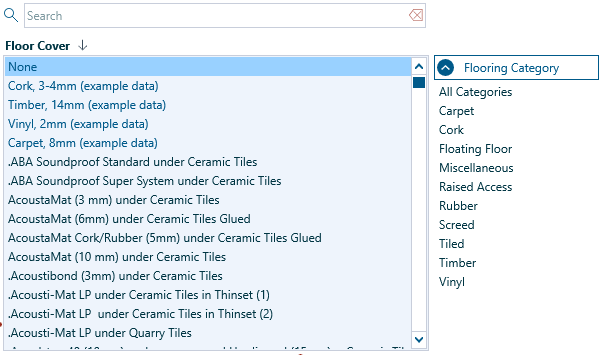
There are options to model floor cover performance based on Measured or Predicted data. As an example to get started with, select Measured and then select a floor cover from the Floor Cover list.
-
The Floor Cover list can be filtered to sort by Category. The Floor Cover list can also be searched by keyword for quick access to materials.
Tip
Because the performance of a floor cover can depend on the underlying type of floor construction, the floor covers included in the INSUL Floor Cover list will change depending on the substructure. INSUL has three catagories of substructure:
INSUL determines the substructure based on the materials selected on the Panel 1 tab from the INSUL Panel tabs.
-
Once a floor cover has been selected, its performance can be viewed from the Floor Cover Chart from the INSUL Charts and Tables. A single number rating for the improvement in impact insulation by the floor cover is shown in the chart legend. The rating is labelled either ΔIIC or ΔLn, depending on the Impact Rating Method selected.
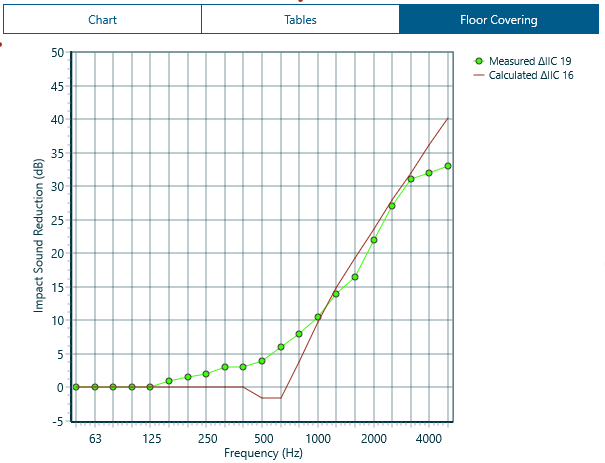
Measured vs predicted floor cover performance
Measured Floor Covers
INSUL includes measured levels of impact sound reduction for a large range of floor covers and finishes.
The data has been obtained from either laboratory measurements, typically according to ISO-140-8, or from field measurements (many of which have been carried out by Marshall Day Acoustics).
Measured data can be edited, imported and deleted from the Materials Editor. If adding new measured data into INSUL, it is recommended to add this to the User list.
Predicted Floor Covers
INSUL includes options for predicting floor cover performance for heavy weight floors, for these types of floor covers:
Cover type |
|---|
| Cork |
| Rubber |
| Screed |
| Tile |
| Timber |
| Vinyl |
Predictions are not currently possible for Carpet or Miscellaneous category floors.
Also, Floating floors and Raised Access floors require alternative modelling techniques.
INSUL includes material properties for all relevant floor covers in the Floor Covers list to enable calculations of predicted performance.
For new floor coverings, relevant data can be edited, imported and del eted from the Materials Editor.
If adding new data for predictions, it is recommended to add this to the User list.