Roofs#
Rain Noise#
To predict levels of rain noise in INSUL:
-
Select the Roof tab from the INSUL Construction tabs.
-
Use the INSUL Panel tabs to select Single or Double as required.
Note
Triple and Quad rain noise calculations are not available.
-
To set the rainfall properties, select the Rainfall tab

-
Two different types of rain are available to model:
-
Once the rainfall properties have been set, the roof construction can be arranged using the INSUL Panel tabs for Single or Double constructions: Panel 1, Frame 1 and Panel 2.
The mass, modulus of elasticity and damping of the roof all influence the rain noise insulation performance of the roof layers.
Joist properties also effect the impact sound insulation performance of light weight floors.
Natural Rain#
To model natural rain, from the Rainfall tab select the Natural Rain tab.
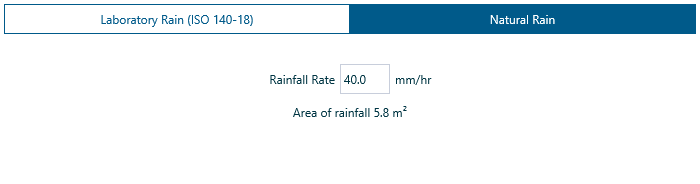
Update the rainfall rate as required by changing the value in the Rainfall Rate box.
Laboratory Rainfall (ISO 140-18)#
To model laboratory rainfall (ISO 140-18), from the Rainfall tab select the Laboratory Rain (ISO 140-18) tab.
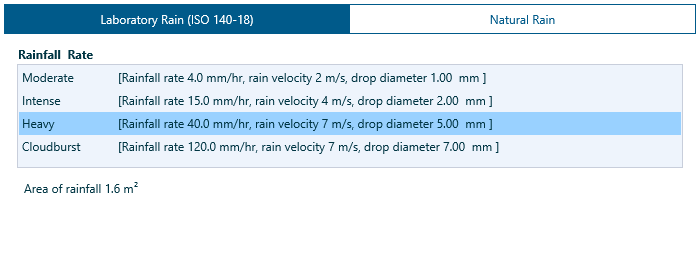
Four different rainfall rates are available:
- Moderate
- Intense
- Heavy
- Cloudburst
The Area of Rainfall is an important variable in a model of laboratory rain.
- Depending on the test set up, the rainfall tank size is likely to be fixed and may not cover the entire roof panel being tested.
- For example, this can mean that doubling the size of a test panel may not double the measured sound pressure level as the amount of actual rainfall remains fixed rather than doubling.
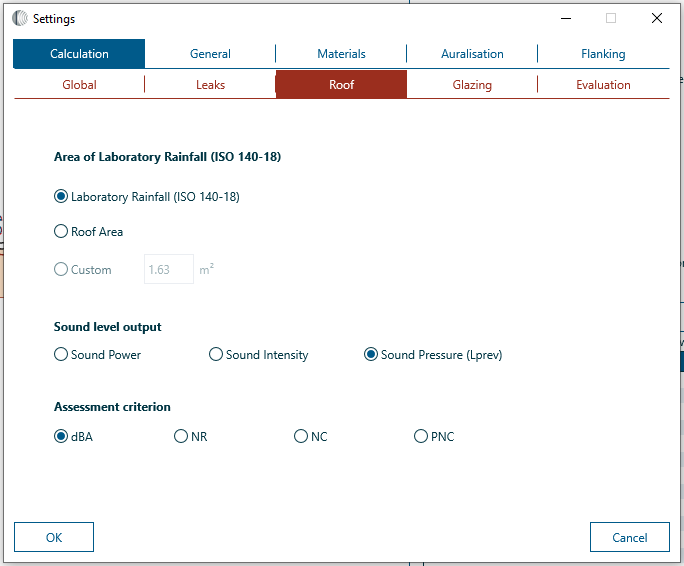
- The Area of Rainfall can be changed from the Settings window by selecting: Calculation > Roof.
Profile Panels#
- To model rain noise on a profiled roof, using the INSUL Panel tabs select the Panel 1 tab.
- Using the Category filter, select Profiled Metal materials
- Select a profiled materials from the Products list
Ceiling#
A ceiling may be included in a roof construction model by selecting Double from the INSUL Panel tabs.
The frame type, ceiling airgap and joist spacing and the inclusion of cavity absorption can all be set directly from the Frame 1 tab.
Rain sound levels#
INSUL can predict rain sound levels as:
- Sound power levels
- Sound pressure levels
- Sound intensity levels
A few notes about rain sound levels....
Behind the scenes, the INSUL algorithms calculate rain sound levels as sound power levels:
- If the input force from the rain is constant, such as with Laboratory Rainfall (ISO 140-18) with a fixed tank size, then calculated sound power levels will not vary significantly with changing panel size.
- Conversely, if the input force from the rain varies with panel size, such as with Natural Rain, then calculated sound power levels will vary with changing panel size.
When the type of rain sound level is sound pressure levels, corrections are applied to account for the reverberation time and volume of the receive room.
When the type of rain sound level is sound intensity levels (which can be thought of as the 'sound power level per unit area'), corrections are applied for panel size. This means that the dependence of sound intensity levels on panel size is different to the trend observed for sound power levels:
- If the input force from the rain is constant, such as with Laboratory Rainfall (ISO 140-18) with a fixed tank size, then calculated sound intensity levels will vary with changing panel size.
- If the input force from the rain varies with panel size, such as with Natural Rain, then calculated sound intensity levels will not vary significantly with changing panel size.
The type of output can be updated from the Settings window by selecting Calculation > Roof.
The single figure index for the predictions can also be set from the Settings window. dBA, NR, NC and PNC ratings are available.
Rain levels and room properties
When the Sound Level Output is Sound pressure levels, the reverberation time and volume of the receive room are important. Changing the reverberation time or room volume will change predicted rain nosie noise levels.
When the Level Output is Sound power levels or Sound intensity levels, changes to reverberation time and room volume will not effect predicted rain noise levels.
Panel Size#
The roof panel size can be updated from the Settings window by selecting Calculation > Global:

Panel size matters...
Changing the panel size can significantly effect predicted rain sound levels.
The way that size effects the calculations depends on the type of rainfall and the type of rain sound levels.
-
With Natural Rain, it is assumed that the rain falls on the entire panel. This means that increasing the panel size also increases the amount of rain falling on the panel. In turn, the calculated sound power level radiated from the panel increases.
-
With Laboratory Rainfall (ISO 140-18), if the size of the rain tank is fixed, increasing the panel size will not significantly effect the calculated sound power level radiated from the panel.
It is important to set the roof panel size accurately in the INSUL model.
R.T., Room Volume#
The reverberation time (R.T.) and room volume can be changed from the Settings window by selecting Calculation > Properties.
When the type of rain sound level is set to Sound pressure levels, the R.T. and room volume have a significant effect on predicted levels.
Item |
Notes |
|---|---|
| Volume | Increasing the room volume (but leaving the rain and roof area settings unchanged) will decrease calculated sound pressure levels for rain noise ~ this is because the same amount of sound energy from the rain is being shared across a larger volume in the receive room. |
| R.T. | Increasing the R.T. will increase calculated sound pressure levels for rain noise ~ when a room is better at trapping sound (that is, when the R.T. is longer), the trapped sound will lead to higher sound pressure levels. |
When the type of rain sound level is set to Sound power levels or Sound intensity levels, the volume and R.T. of the receive room will not effect predicted levels.